
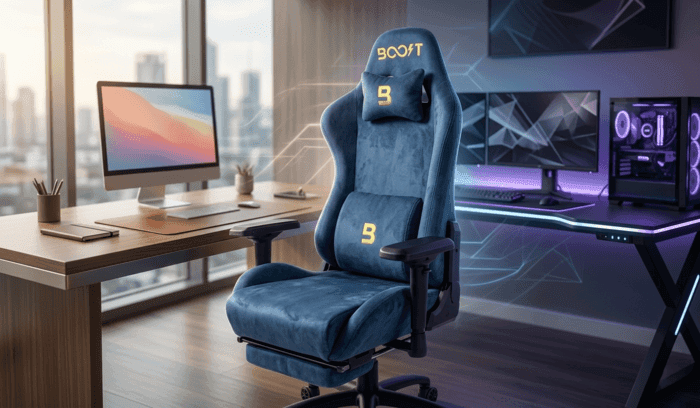

Your day might begin with focused work at a desk requiring good posture in Karachi, move into several hours of calls and typing, and later shift to intense gaming sessions that stretch late into the night in Lahore or Islamabad. In Pakistan, where routines often blend long professional hours, remote meetings, and serious gaming time, having one chair that performs well in both scenarios saves space, money, and daily hassle. An ergonomic office chair is designed with health and adaptability in mind, making it surprisingly well-suited for both upright office work and relaxed gaming setups. While many assume gaming chairs are only for play, ergonomic models offer precise support, multiple adjustments, and long-hour comfort that benefit both activities. The right ergonomic office chair can reduce back strain during work while still allowing comfortable reclining for gaming, creating a versatile seating solution that adapts to your full day. No more switching chairs or suffering from poor posture when moving between tasks.
- Why Versatility Matters for Mixed Office and Gaming Use
- How Much Adjustability Is Needed for Both Activities?
- Which Materials Make the Chair Suitable for Long Hours?
- Does Lumbar and Posture Support Work for Both Work and Gaming?
- What Comfort Features Benefit Office and Gaming Equally?
- How Do Mechanisms and Build Quality Support Dual Use?
- Why Long-Term Health and Comfort Make It Ideal for Both?
- Activity Match Quick Table
- How Do Practicality and Everyday Usability Compare?
- What Final Reality Checks Should You Make?
- Do Gaming Setups Really Benefit from Ergonomic Features?
- Comparing Options That Excel in Dual Use
- FAQs About Ergonomic Chairs for Office and Gaming
- Can one ergonomic office chair really work well for gaming too?
- Which features matter most for switching between office and gaming?
- Are ergonomic chairs comfortable for long gaming hours?
- How important is breathable material in Pakistan?
- Where can I try ergonomic chairs for both uses in Pakistan?
- To Round Things Off
One properly chosen ergonomic chair can support your body effectively whether you are working or gaming for hours.
Why Versatility Matters for Mixed Office and Gaming Use
In Pakistan’s busy lifestyles, many people spend their day at a desk for work and then use the same space for gaming in the evening. A single chair that handles both saves the cost and space of buying separate seats. An ergonomic office chair excels here because it is built around healthy sitting principles rather than just style. It provides strong lumbar support for upright work posture during typing and meetings, then easily adjusts to a slight recline for more relaxed gaming sessions. This adaptability prevents the slouching or discomfort that often comes from using a chair designed only for one activity. For remote workers who switch between spreadsheets and game raids, or students balancing study and play, one versatile chair creates a smoother routine and protects long-term back health across different sitting positions and durations.
How Much Adjustability Is Needed for Both Activities?
Adjustability is the key feature that allows one chair to feel comfortable and supportive during focused office work as well as relaxed gaming.
- Height adjustment range of 80–100mm: Lets you set the perfect seat height for your desk during work so feet stay flat and arms align naturally with the keyboard, then lower it slightly for a more casual gaming posture without losing stability.
- Recline angle from 90 to 160 degrees with locks: Supports upright positioning for productive office hours and controlled leaning for comfortable gaming sessions or short breaks, preventing strain on the lower back.
- 4D or multi-adjustable armrests: Move in height, width, depth, and angle to support elbows properly during mouse and keyboard work or controller use in games, reducing shoulder tension in both scenarios.
- Adjustable lumbar support: Moves up or down and in or out to match your spine’s natural curve, providing essential lower back relief during long work hours and maintaining comfort when reclined for gaming.
- Synchro-tilt or multi-function mechanisms: Allow the seat and back to move together smoothly, encouraging subtle shifts during work while offering stable support when you lean back during intense gaming moments.
- Headrest height and angle adjustment: Positions neck support correctly for upright screen focus during calls or slightly tilted viewing during gaming, avoiding neck pain after extended use.
- Seat depth slider: Adjusts how far the seat extends to support different leg lengths, ensuring proper thigh support whether sitting straight for work or more relaxed for play.
Which Materials Make the Chair Suitable for Long Hours?
Materials play a major role in keeping the chair comfortable and practical for both air-conditioned offices and warmer home gaming setups in Pakistan.
- Breathable mesh backrest: Allows constant airflow to prevent sweating and overheating during long summer workdays or evening gaming sessions in rooms without strong cooling.
- High-density foam with zoned cushioning: Maintains its shape and support over many hours, providing firm yet comfortable seating for both focused typing and relaxed gaming without bottoming out.
- Skin-friendly, durable fabrics: Resist wear from daily use and feel pleasant against the skin even after 8–10 hours, whether in professional attire for work or casual clothes for gaming.
- Reinforced steel frame and base: Offers strong stability and high weight capacity so the chair remains steady during dynamic movements in gaming or frequent swiveling at the office desk.
- Smooth-rolling casters: Move quietly on tiles or carpets common in Pakistani homes and offices, making it easy to adjust position without noise during calls or late-night gaming.
- Easy-to-clean surfaces: Allow quick wiping of dust or accidental spills, keeping the chair looking professional for video meetings while handling everyday use.
A chair that becomes hot and uncomfortable after a few hours loses its value quickly in Pakistan’s mixed daily routines.
Does Lumbar and Posture Support Work for Both Work and Gaming?
Proper lumbar and posture support is what makes an ergonomic office chair stand out for dual use, actively helping the body maintain healthy alignment in different positions.
- Dynamic lumbar adjustment: Fills the natural curve of the lower back during upright office work and continues to provide support when you recline slightly for gaming.
- Full high-back design: Supports the entire spine from neck to tailbone, reducing slouching during long typing sessions or forward-leaning gaming postures.
- Waterfall seat edge: Relieves pressure behind the knees, improving blood flow whether you sit straight for work or lean back during extended play.
- Pelvic tilt encouragement: Helps maintain the natural S-shape of the spine in both upright and reclined positions, lowering the risk of lower back pain.
- Adjustable headrest: Keeps the neck in a neutral position during monitor work or when viewing screens at different angles while gaming.
- Even weight distribution: Prevents pressure points on hips and tailbone, allowing longer comfortable sitting across both professional and leisure activities.
What Comfort Features Benefit Office and Gaming Equally?
Comfort features in ergonomic chairs focus on sustained support rather than initial plushness, making them ideal for switching between concentrated work and immersive gaming.
Ergonomic shaping and padding help maintain good posture during hours of typing and screen focus at the office, while the same adjustments allow a more relaxed but still supported position when gaming. Breathable materials keep you cool during hot days at work or warm evening sessions at home. Wide, contoured seats accommodate different body types and sitting styles without causing discomfort in either activity. Multi-adjustable components let you fine-tune the chair quickly when moving from upright work mode to a slightly reclined gaming setup. In Pakistan’s combination of desk-bound professional hours and passionate gaming time, these comfort elements reduce fatigue and strain, helping you stay productive at work and fully enjoy gaming without physical distractions. An ergonomic office chair that delivers this balanced comfort becomes a smart investment for anyone with mixed daily routines.
How Do Mechanisms and Build Quality Support Dual Use?
Strong mechanisms and solid construction ensure the chair remains reliable and smooth when used for both serious work and energetic gaming sessions.
- Class 4 gaslift: Provides stable height adjustment and supports higher weight capacities without sinking or wobbling during frequent changes between work and play postures.
- Multi-lock tilt mechanisms: Allow secure positioning at various recline angles, giving firm support for focused office tasks and safe leaning for gaming excitement.
- Reinforced five-star base: Delivers excellent stability on different floor types, preventing tipping or rocking when shifting positions quickly during games or standing up from work.
- High-cycle durability: Designed to handle thousands of adjustments and movements without loosening, making it suitable for daily transitions between office and gaming use.
- Quiet and smooth operation: Ensures no creaking or noise during important calls or late-night gaming sessions in shared living spaces.
- Serviceable parts: Makes maintenance and repairs easier through local support, extending the chair’s life across years of mixed daily use.
Why Long-Term Health and Comfort Make It Ideal for Both?
The biggest advantage of an ergonomic office chair for dual use lies in its focus on long-term health, which benefits both professional work and recreational gaming.
- Reduced risk of back and neck pain: Proper support and alignment help prevent the strain that builds from poor posture during long work hours or slouched gaming.
- Better circulation and less leg fatigue: Adjustable seat and tilt features improve blood flow, keeping legs comfortable whether sitting upright for meetings or relaxed for games.
- Improved shoulder and wrist positioning: Adjustable armrests reduce tension from mouse work or controller use, supporting both productivity and gaming performance.
- Sustained energy levels: Less physical discomfort means better focus during office tasks and more enjoyment during extended gaming sessions.
- Prevention of repetitive strain: Fine adjustments encourage healthier sitting habits that carry over between work and play activities.
- Overall posture improvement: Regular use helps train the body toward better alignment, benefiting health beyond just sitting time.
Activity Match Quick Table
Main Activity Mix | Key Ergonomic Features | Benefit for Dual Use |
Office Work + Calls | Adjustable lumbar, 4D armrests, upright support | Maintains focus and reduces strain |
Gaming Sessions | Controlled recline, headrest, stable base | Allows relaxed posture without losing support |
Long Mixed Days | Breathable mesh, synchro-tilt, height range | Keeps comfort consistent across tasks |
Health-Focused Use | Dynamic lumbar, seat depth slider | Prevents pain and improves circulation |
Budget Versatile Choice | Balanced adjustments and durability | Offers value for both work and gaming |
How Do Practicality and Everyday Usability Compare?
Practical details turn a good ergonomic office chair into one that fits seamlessly into both professional and gaming parts of your day. Neutral, professional styling looks appropriate during video calls while still feeling modern for gaming setups. Compact yet supportive design fits under standard desks without taking too much space in smaller Pakistani homes. Quiet casters and smooth adjustments make repositioning effortless when moving between tasks. Easy-clean materials handle daily dust and occasional spills from work or gaming snacks. These everyday usability factors mean the chair integrates naturally into your routine instead of feeling like separate furniture for work and play. When an ergonomic office chair combines strong support with practical design, it becomes the most convenient choice for anyone balancing office work and gaming setups.
The ideal chair works quietly in the background, supporting your body no matter which activity fills your screen.
What Final Reality Checks Should You Make?
Before deciding, a few practical steps help confirm the chair will truly suit both your office work and gaming needs.
- Sit in the chair for at least 40–60 minutes: Test how support and comfort feel after the initial excitement fades to reveal real long-hour performance.
- Adjust every feature in your actual setup: Check if lumbar, armrests, height, and recline match your desk height, monitor position, and preferred gaming posture.
- Read long-term user experiences in Pakistan: Look for feedback after several months regarding durability, heat management, and back comfort in local conditions.
- Test stability during movement: Lean back, swivel, and shift positions to ensure the chair feels secure for both calm work and more active gaming moments.
- Verify weight capacity and warranty: Make sure it supports your body size with reliable local service coverage for any future issues.
- Measure against your space: Confirm the chair fits comfortably under your desk and in your room without blocking movement during daily use.
Do Gaming Setups Really Benefit from Ergonomic Features?
Even if gaming is a major part of your routine, ergonomic features provide noticeable advantages that regular gaming chairs often lack.
- Precise lumbar support: Maintains healthy spine alignment during long raids or streaming sessions, reducing lower back fatigue that builds from fixed padding.
- Adjustable armrests: Position elbows correctly for mouse and keyboard control, lowering shoulder and wrist strain during competitive or casual play.
- Breathable materials: Keep you cooler during intense night sessions in warm rooms, preventing discomfort that distracts from gameplay.
- Controlled recline options: Allow safe leaning without extreme angles that can stress the back over time.
- Stable base and mechanisms: Provide confidence when making quick movements in games while still offering solid support for work earlier in the day.
- Better overall endurance: Reduced physical strain means you can enjoy longer gaming sessions with better focus and less post-game stiffness.
When your day includes both office responsibilities and gaming passion, ergonomic features create a single chair that performs excellently in both worlds without compromise.
Comparing Options That Excel in Dual Use
Here is a quick side-by-side look at how Boost Surge Pro, Boost Synergy, and Boost Impulse compare for office work and gaming setups.
Feature | Boost Surge Pro | Boost Synergy | Boost Impulse |
Price (PKR) | 34,999 | 48,999 | 38,999 |
Lumbar Support | Adjustable linkage | Adjustable | Basic fixed |
Armrest Type | Innovative adjustable | 3D adjustable | Fixed |
Recline Angle | 90–135° with control | 90–180° | 90–160° |
Material | Premium velvet + mesh | PU leather | PVC leather |
Weight Capacity | 120kg | 120kg | 120kg |
Best For Dual Use | Office focus + moderate gaming | Balanced work and gaming | Gaming primary |
Extra Feature | Integrated footrest | Class 4 gaslift + butterfly | Butterfly mechanism |
FAQs About Ergonomic Chairs for Office and Gaming
Can one ergonomic office chair really work well for gaming too?
Yes, models with good recline range, adjustable lumbar, and armrests provide excellent support for both upright work and relaxed gaming sessions.
Which features matter most for switching between office and gaming?
Adjustable lumbar support, 4D armrests, and controlled recline angles allow quick and comfortable transitions between the two activities.
Are ergonomic chairs comfortable for long gaming hours?
They often provide better long-term comfort than many regular gaming chairs because of superior posture support and breathability.
How important is breathable material in Pakistan?
Very important—mesh or hybrid fabrics prevent overheating during long workdays or warm evening gaming sessions.
Where can I try ergonomic chairs for both uses in Pakistan?
Furniture and electronics stores in major cities usually have display models; use return periods to test them in your actual office and gaming routine.
To Round Things Off
Ergonomic chairs become ideal for both office work and gaming setups because of their strong focus on precise adjustability, targeted lumbar and posture support, breathable materials, and durable mechanisms that adapt to different sitting positions and durations. In Pakistan’s reality of combined professional hours and passionate gaming time, one versatile ergonomic office chair simplifies your space while protecting back health and maintaining comfort across the full day. Unlike chairs built only for style or extreme recline, ergonomic designs prioritize how your body feels after many hours, whether working or playing. Look for good lumbar adjustment, multi-directional armrests, controlled recline, and climate-friendly materials when choosing seating for mixed use. Test the chair thoroughly in your real setup, and you will discover how much better a single well-designed ergonomic office chair can make both your work productivity and gaming enjoyment.
The right ergonomic chair doesn’t force you to choose between work and gaming—it simply supports you in both.